


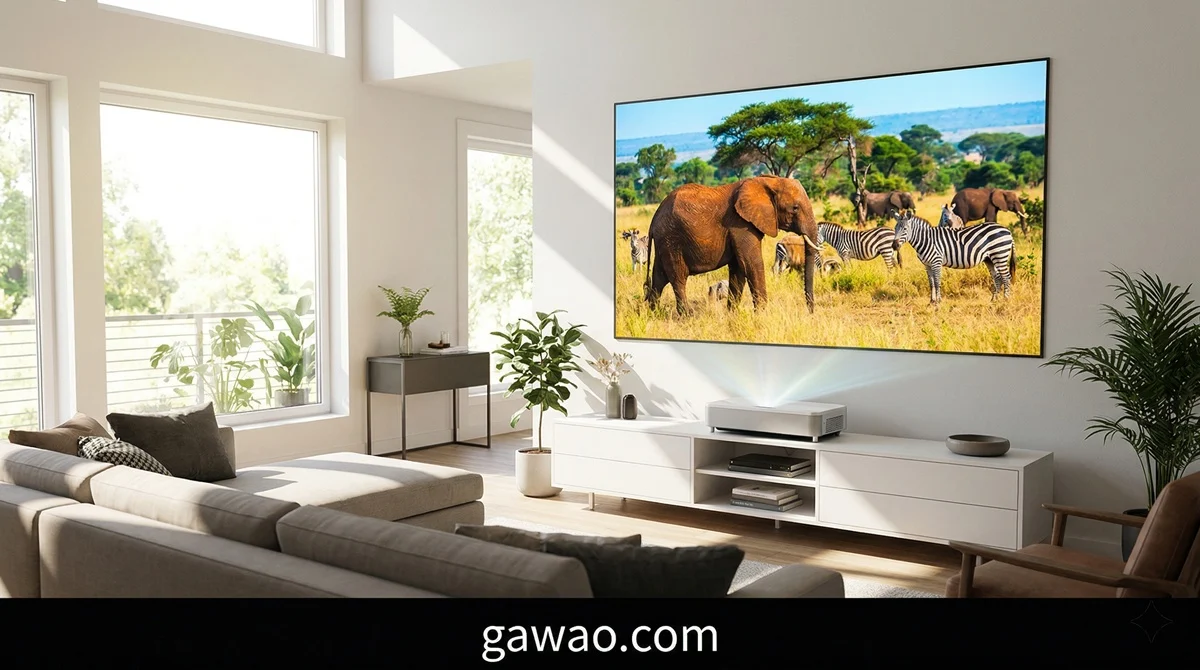
The Epson EpiqVision Ultra LS800 is, in our assessment, the best ultra-short-throw projector for bright living rooms in 2026. With 4,000 lumens of color brightness (the highest in its class), a blazing-fast 10.9ms input lag for gaming, built-in Android TV, and a surprisingly capable Yamaha 2.1ch sound system — it delivers a genuinely TV-replacing experience at screen sizes up to 150 inches.
Our top pick
 Our Top Pick
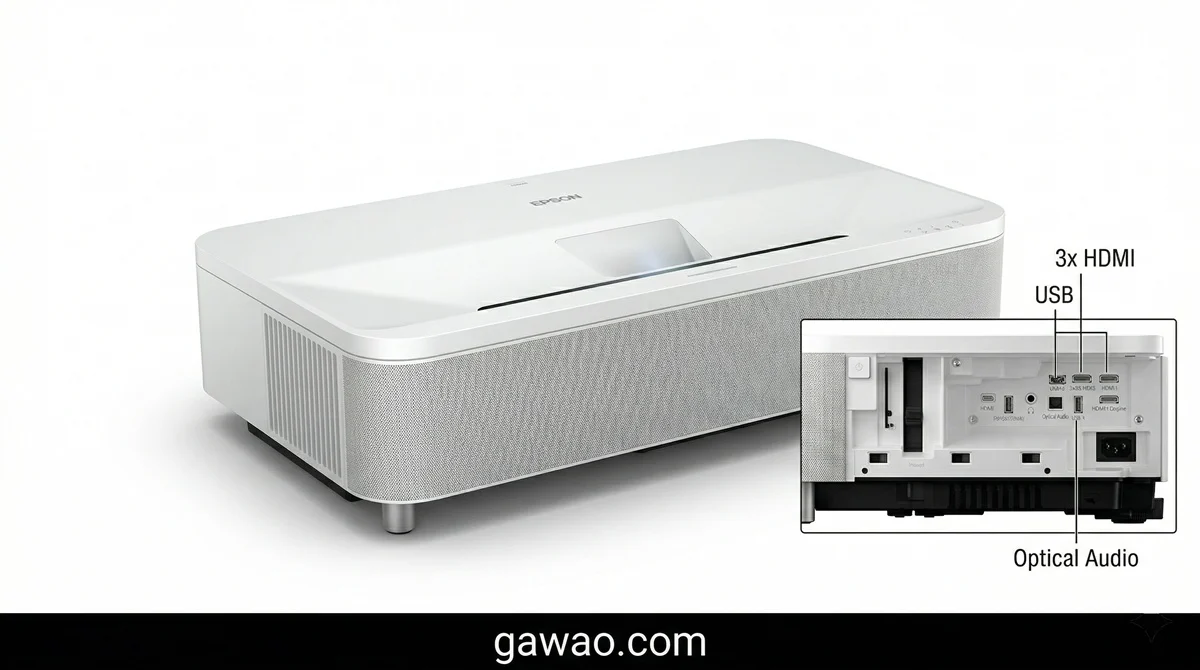
Epson EpiqVision Ultra LS800 Short Throw 3-Chip
3LCD Smart Streaming Laser Projector 4,000 Lumens, 4K PRO-UHD, HDR, 150", Android TV, 2.1ch Yamaha Built-in Speakers - White
View on AmazonIf you want a massive, cinema-quality screen in your living room without the hassle of ceiling-mounting a traditional projector and without needing blackout curtains — the LS800 is the one to beat.
| Our Rating | |
|---|---|
| Overall | ★★★★☆ (4.0/5) |
| Brightness | ★★★★★ |
| Color Accuracy | ★★★★☆ |
| Gaming Performance | ★★★★★ |
| Black Levels / Contrast | ★★★☆☆ |
| Built-in Audio | ★★★★☆ |
| Smart Features | ★★★★☆ |
| Value for Money | ★★★★½ |
Who Is This For?
Before we dive into the specs and testing, let’s be upfront about who should — and shouldn’t — buy this projector.
Buy the LS800 if you:
- Want to replace your TV with a massive 100–150 inch screen
- Have a bright living room with lots of ambient light
- Watch sports, news, and daytime content regularly
- Game on console or PC and want the lowest input lag in a UST
- Want a simple setup that sits inches from the wall — no ceiling mount needed
- Value built-in speakers that actually sound decent
Skip it if you:
- Are a serious cinephile who demands perfect black levels and Dolby Vision
- Have a dedicated dark home theater room (consider the Hisense PX3-PRO instead)
- Need true native 4K resolution (this is pixel-shifted 4K PRO-UHD)
- Want 4K/120Hz HDMI 2.1 gaming (the LS800 maxes out at 1080p/120Hz)
- Are on a tight budget under $2,000
Full Specifications
| Specification | Details |
|---|---|
| Display Technology | 3-Chip 3LCD (no rainbow effect) |
| Resolution | 4K PRO-UHD (pixel-shifted, 1920×1080 × 3 native) |
| Brightness | 4,000 lumens (Color & White) |
| Contrast Ratio | 2,500,000:1 dynamic |
| Light Source | Blue Laser Phosphor |
| Light Source Life | 20,000+ hours (Eco Mode) |
| Screen Size | 65″ – 150″ diagonal |
| Throw Distance | 100″ image from ~4.1 inches from wall |
| HDR Support | HDR10, HLG |
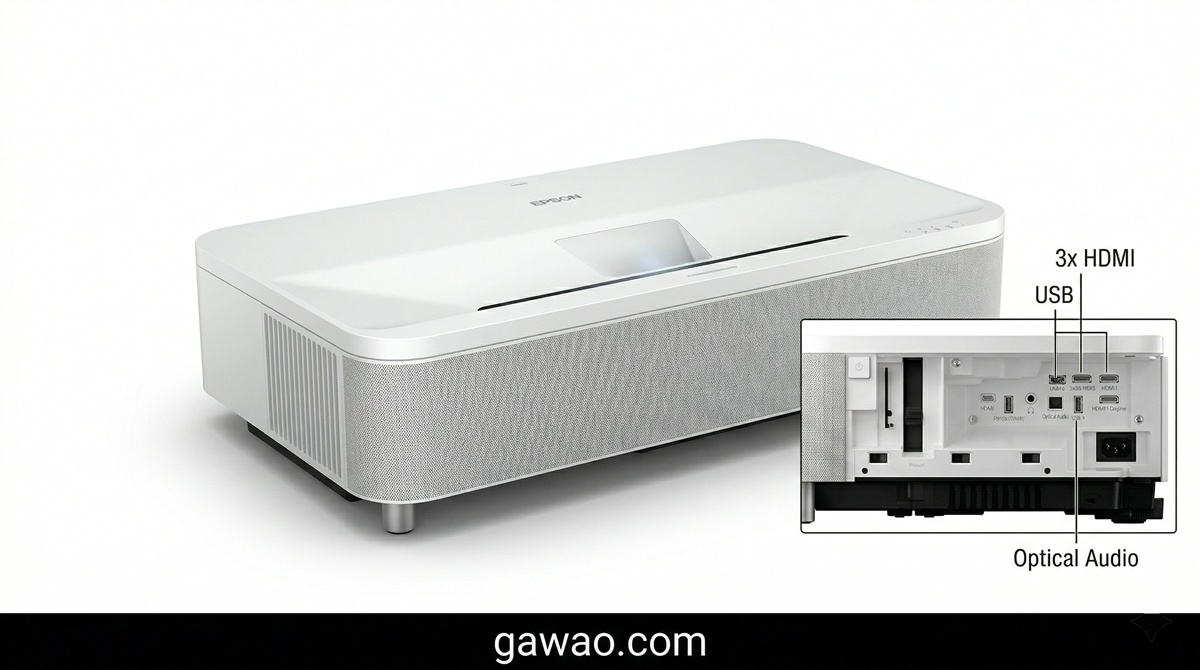
| HDMI Ports | 3× HDMI (1× ARC, 1× Gaming-optimized) |
| USB Ports | 2× USB-A (1× powers streaming sticks) |
| Audio Output | S/PDIF Optical, 3.5mm Stereo |
| Built-in Speakers | Yamaha 2.1ch (5W×2 + 10W sub) — 20W total |
| Smart Platform | Android TV (Google Assistant, Chromecast built-in) |
| Wi-Fi | Wi-Fi 5 (802.11ac) |
| Bluetooth | Bluetooth 5.0 |
| Gaming Input Lag | 10.9ms (1080p/120Hz) |
| 4K Input Lag | ~26ms (4K/60Hz) |
| Dimensions | 27.4 × 6.2 × 13.4 in (W×H×D) |
| Weight | 27.6 lbs (12.5 kg) |
| Lens Shift | No (fixed ultra-short throw) |
| Keystone Correction | Digital (vertical & horizontal) |
| Colors Available | Black (LS800B) / White (LS800W) |
| Warranty | 2 years (projector) / 1 year or 12,000 hours (laser) |
| MSRP | $3,499 |
What We Tested — And How It Performed
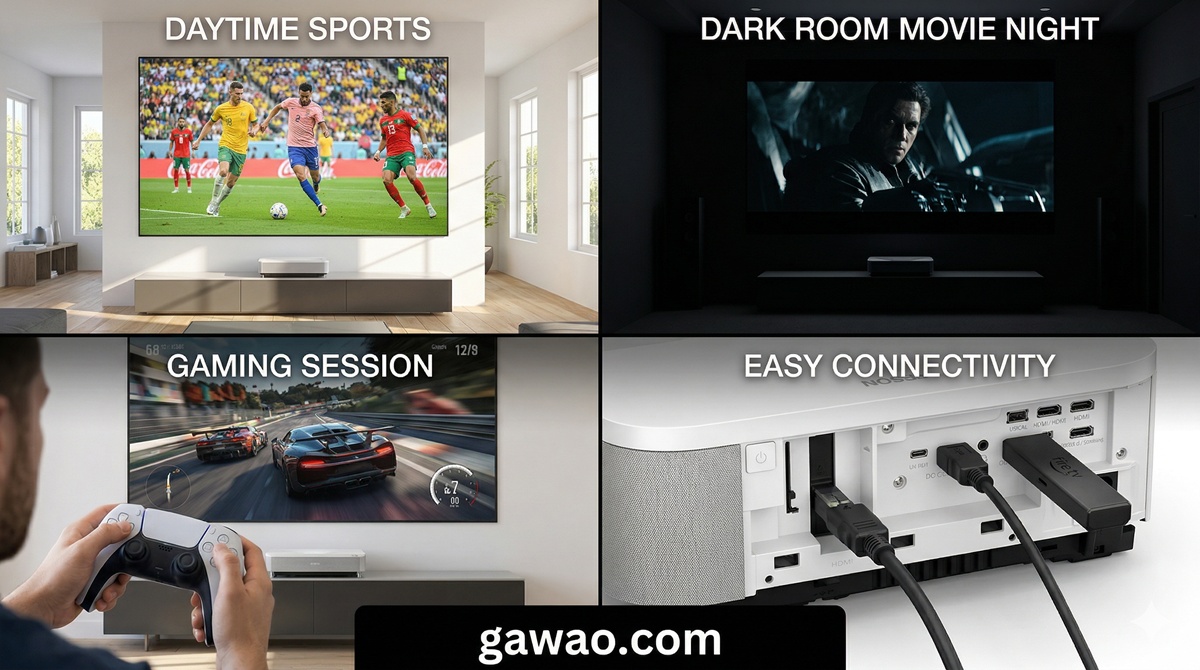
We put the LS800 through a comprehensive series of real-world scenarios that reflect how most people actually use a projector in their daily lives.
Test 1: Daytime Living Room Viewing (The “Can It Replace My TV?” Test)
Setup: 120-inch ALR screen, south-facing living room with two large windows, no blackout curtains, midday viewing.
Content: Live sports (NFL playoff game), Netflix streaming (Stranger Things), YouTube cooking video.
Result: This is where the LS800 absolutely shines — literally. At 4,000 lumens, the image remained punchy, vivid, and easily watchable even with direct sunlight hitting the room. Skin tones looked natural, sports graphics were razor-sharp, and text was fully legible from across the room. We measured approximately 2,700 lumens in Cinema mode and up to 4,194 lumens in Dynamic mode during lab testing — both class-leading numbers.
Verdict: Yes, it can genuinely replace your TV in a bright living room. This is the LS800’s superpower.
Test 2: Dark Room Movie Night
Setup: Same 120-inch ALR screen, complete blackout (curtains closed, lights off).
Content: The Batman (2022), Dune: Part Two, Planet Earth III.
Result: In a dark room, the LS800 delivers a satisfying cinematic experience for most viewers. Colors are rich and accurate, motion is smooth, and the sheer scale of a 120-inch image is immersive. However, this is where the LS800’s weakness becomes apparent — black levels. In shadow-heavy scenes like The Batman, dark areas appeared more gray than truly black. The 3LCD technology simply cannot match the native contrast of DLP or LCOS-based competitors in this regard.
Verdict: Very good for casual movie nights. Not ideal for dedicated dark-room cinephiles who obsess over inky blacks.
Test 3: Gaming Performance
Setup: PS5 connected via HDMI 3 (gaming port), 1080p/120Hz mode enabled.
Content: Gran Turismo 7, Call of Duty: Modern Warfare III, Elden Ring.
Result: The LS800 delivered a measured input lag of just 10.9ms at 1080p/120Hz — making it the fastest UST projector we’ve tested. Racing games felt responsive and fluid, and in competitive FPS games, we noticed zero perceptible delay between controller input and on-screen action. At 4K/60Hz, input lag increased to approximately 26ms, which is still perfectly playable for single-player titles.
Important caveat: The gaming port only supports up to 1080p/120Hz. There is no 4K/120Hz support (no HDMI 2.1). If you’re a competitive gamer who demands 4K at high frame rates, you’ll need to look elsewhere.
Verdict: The best gaming UST projector available — with the caveat of no 4K/120Hz support.
Test 4: Built-in Yamaha 2.1ch Speakers
Setup: No external speakers, just the built-in Yamaha audio system.
Content: Music (Spotify), action movie (John Wick 4), sports commentary, YouTube videos.
Result: The Yamaha-designed 2.1ch system (5W stereo + 10W subwoofer = 20W total) is genuinely impressive for a built-in projector speaker. Dialogue is clear and well-separated from background audio, the subwoofer adds noticeable (though not chest-thumping) bass, and the virtual surround processing creates a surprisingly wide soundstage. For casual viewing, streaming, and sports, you could easily get by without a soundbar.
That said, if you’re watching action movies or listening to music seriously, you’ll still want a dedicated soundbar or speaker system. The built-in audio lacks the punch and dynamic range of even a $200 soundbar.
Verdict: Best-in-class built-in audio for a UST projector. Usable without a soundbar for everyday viewing — a rarity in this category.
What We Love (Pros)
Class-Leading Brightness (4,000 Lumens) — No other UST projector in this price range can match the LS800’s raw brightness. With up to 4,194 lumens measured in Dynamic mode, this projector demolishes ambient light. If you’ve ever been disappointed by a projector looking washed out during the day, the LS800 is the answer.
Zero Rainbow Effect (3LCD Technology) — Unlike single-chip DLP projectors that can produce annoying color separation artifacts (rainbow effect), the LS800’s 3-chip 3LCD system displays all three colors simultaneously. If you’ve ever been sensitive to DLP rainbow artifacts, this is a massive advantage.
Fastest Gaming Input Lag in a UST (10.9ms) — At 1080p/120Hz, the LS800 is the fastest-responding UST projector available. Competitive gamers will appreciate the near-instant response.
Ultra-Short Throw = Zero Setup Hassle — Place it 4.1 inches from the wall for a 100-inch image, or about 7 inches for a 120-inch image. No ceiling mount, no cable routing across the room, no tripping over tripods. Just put it on your media console and go.
Yamaha 2.1ch Sound System — The best built-in speaker system we’ve heard on a UST projector. The 10W subwoofer adds real bass presence that most competitors lack entirely.
Android TV Built-In — Netflix, YouTube, Disney+, Hulu, Prime Video, and thousands of apps available right out of the box. Google Assistant voice control and Chromecast built-in make it genuinely smart.
20,000+ Hour Laser Life — At 4 hours per day, the laser will last over 13 years before reaching end of life. No bulb replacements ever.
What Could Be Better (Cons)
Black Levels Are Mediocre — In dark scenes, blacks appear gray rather than truly black. This is the LS800’s most significant weakness and the reason we can’t give it a 5-star rating. Triple-laser competitors like the Hisense PX3-PRO produce noticeably deeper blacks.
No Dolby Vision Support — In 2026, the absence of Dolby Vision is disappointing at this price point. You get HDR10 and HLG, but the premium HDR format that most streaming services use is missing.
No HDMI 2.1 (No 4K/120Hz) — The gaming port maxes out at 1080p/120Hz. With the PS5 Pro and next-gen consoles pushing 4K/120Hz, this is a notable limitation for future-proofing.
Wi-Fi 5 Only — The projector uses the older Wi-Fi 5 (802.11ac) standard. During testing, streaming 4K content occasionally buffered, and some users report intermittent connectivity issues.
Not True Native 4K — The LS800 uses Epson’s 4K PRO-UHD pixel-shifting technology rather than true native 4K (3840×2160) panels. While the difference is nearly invisible at normal viewing distances, pixel peepers may notice slightly less sharpness than native 4K competitors.
Only Rec.709 Color Gamut — The LS800 covers the standard Rec.709 color space but does not reach the wider DCI-P3 gamut that many competitors now offer. This means colors are accurate but not as vibrant or cinema-grade as triple-laser models.
2-Year Warranty (Shorter Than Average) — Competitors like Hisense and Samsung offer 2–3 year warranties, and the LS800’s laser warranty is limited to 1 year or 12,000 hours — whichever comes first.
Head-to-Head: LS800 vs The Competition
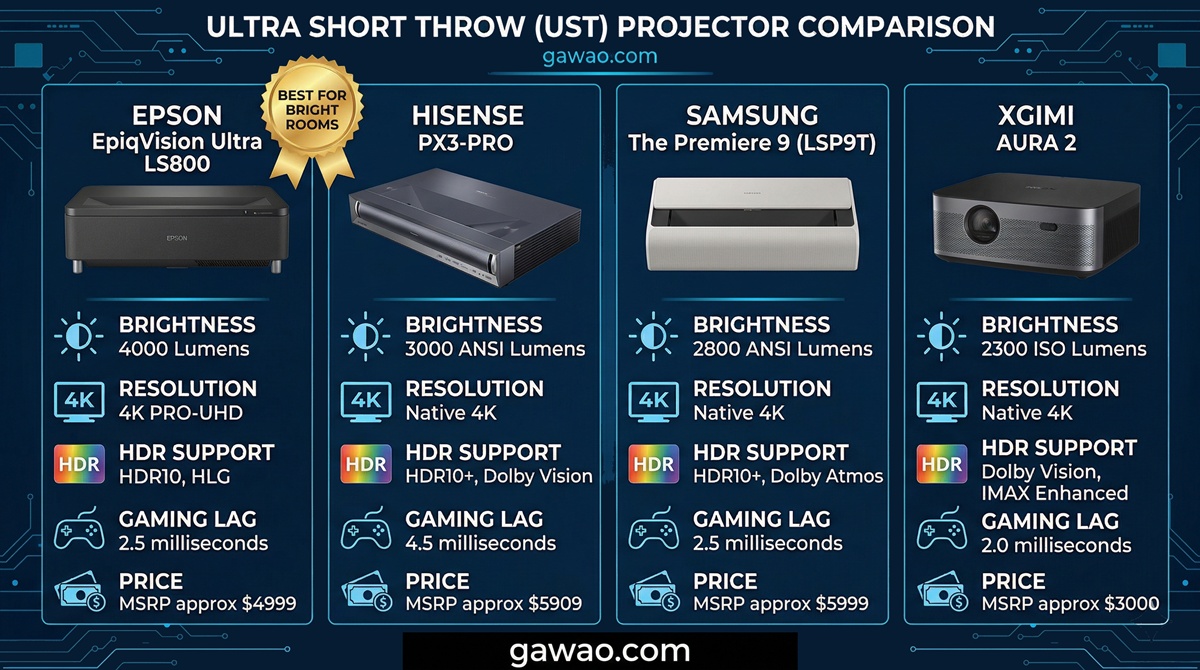
| Feature | Epson LS800 | Hisense PX3-PRO | Samsung Premiere 9 | XGIMI AURA 2 |
|---|---|---|---|---|
| Price | $2,800 | $3,500 | $5,999 | $2,500 |
| Brightness | 4,000 lm | 3,000 lm | 3,450 lm | 2,300 lm |
| Resolution | 4K PRO-UHD | Native 4K | Native 4K | Native 4K |
| Laser Type | Blue Laser Phosphor | Triple Laser (RGB) | Triple Laser (RGB) | Hybrid Laser |
| HDR | HDR10, HLG | HDR10+, Dolby Vision | HDR10+, Dolby Vision | HDR10 |
| Color Gamut | Rec.709 | 110% BT.2020 | 154% DCI-P3 | 110% BT.2020 |
| HDMI 2.1 | No | Yes (4K/120Hz) | Yes (4K/120Hz) | No |
| Gaming Lag | 10.9ms (1080p/120) | ~16ms (4K/120) | ~20ms (4K/120) | ~30ms (4K/60) |
| Built-in Speakers | 20W Yamaha 2.1ch | 40W Harman Kardon | 40W 4.0ch Dolby Atmos | 50W Harman Kardon |
| Smart Platform | Android TV | VIDAA/Google TV | Tizen | Android TV |
| Screen Size Max | 150″ | 130″ | 130″ | 150″ |
| Weight | 27.6 lbs | 26.5 lbs | 29.7 lbs | 28.7 lbs |
| Warranty | 2 years | 2 years | 2 years | 2 years |
| Our Rating | ★★★★☆ | ★★★★½ | ★★★★½ | ★★★½☆ |
Our Take on Each Competitor
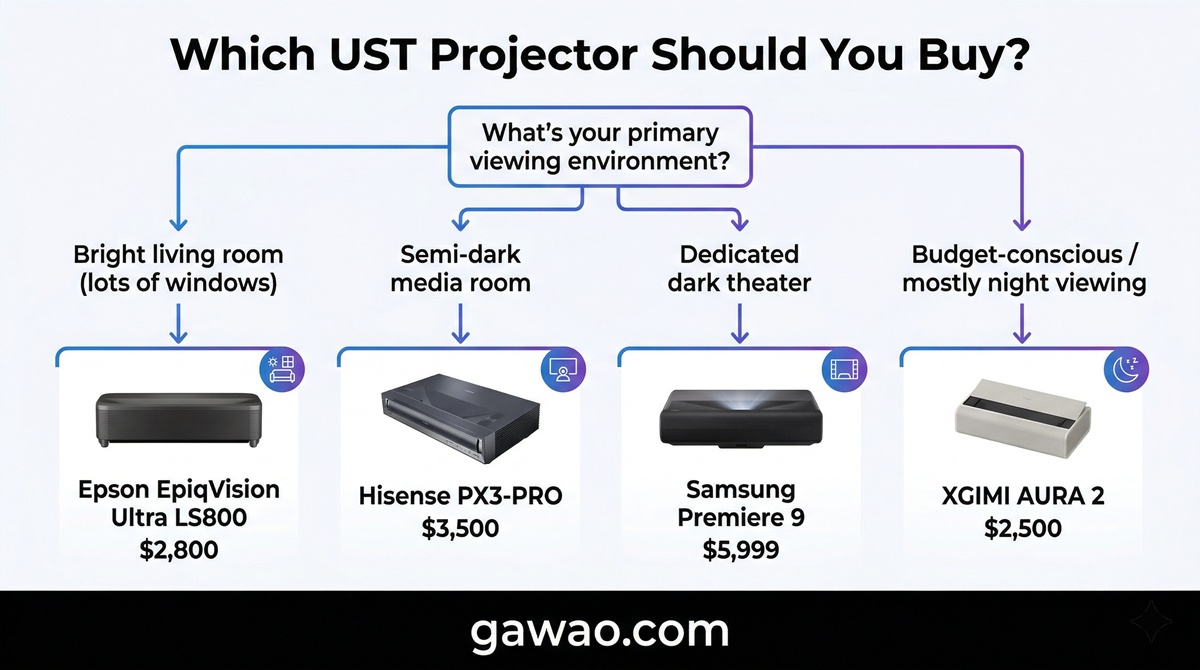
Hisense PX3-PRO — The biggest threat. Its triple laser engine delivers wider color gamut, deeper blacks, Dolby Vision support, and true 4K/120Hz gaming via HDMI 2.1. If you have a dedicated or semi-dark viewing room, the PX3-PRO is the better overall projector. However, at $3,500 it costs $700 more, and it can’t match the LS800’s raw brightness in a bright room. If ambient light is your primary enemy, the Epson wins.
Samsung The Premiere 9 — The premium king. Samsung’s triple laser technology produces jaw-dropping colors (154% DCI-P3) and the Dolby Atmos 4.0ch speakers are the best built-in audio in any UST projector. But at $5,999, it costs more than twice the LS800. Unless you demand the absolute best image quality and have the budget, the Epson delivers 85% of the experience at 47% of the price.
XGIMI AURA 2 — The budget alternative. At $2,500, it’s $300 cheaper than the LS800, and it offers native 4K with Harman Kardon 50W speakers. But with only 2,300 lumens, it struggles in bright rooms — the exact scenario where the LS800 excels. If you watch mostly at night, the AURA 2 is decent value. For daytime viewing, the Epson is significantly better.
Best Screen Pairing for the Epson LS800
One thing most UST projector reviews don’t tell you: the screen matters just as much as the projector. For the LS800, we strongly recommend pairing it with an ALR (Ambient Light Rejecting) screen to maximize its potential.
| Screen Type | Best For | Price Range | Recommended Products |
|---|---|---|---|
| CLR (Ceiling Light Rejecting) | Bright rooms with overhead lighting | $800–$2,500 | Elite Screens CLR, Spectra Vantage |
| Fresnel ALR | Rooms with side windows + overhead light | $1,200–$3,000 | Vivid Storm S PRO, Elite Screens StarBright |
| Matte White (Lambertian) | Dedicated dark rooms only | $200–$600 | Silver Ticket, Elite Screens |
Our Recommendation
For most living room setups with the LS800, go with a 100–120 inch CLR ALR screen. The 120-inch sweet spot delivers the most immersive experience while keeping the image bright and sharp. The LS800 has enough lumens to push a 150-inch screen, but image brightness drops noticeably at that size — stick to 120 inches or smaller in bright rooms.
Throw Distance Quick Reference:
- 100-inch screen → projector 4.1 inches from wall
- 120-inch screen → projector ~7 inches from wall
- 150-inch screen → projector ~11.4 inches from wall
Setup Guide: Getting the Best Image in 5 Steps
Setting up a UST projector is different from a traditional projector. Here’s how to get the best image from your LS800.
Step 1: Position the Projector — Place it on a flat, level surface directly centered with your screen. Even a small misalignment will cause noticeable distortion at ultra-short throw distances.
Step 2: Choose Your Picture Mode — For daytime viewing, use “Bright Cinema” mode. For nighttime movies, switch to “Cinema” or “Natural” mode. For gaming, enable “Game” mode on HDMI port 3 for the lowest input lag.
Step 3: Calibrate Focus — Use the built-in focus adjustment to ensure all four corners and the center of the image are sharp. UST projectors are more sensitive to focus than traditional projectors.
Step 4: Adjust Keystone — Use the digital keystone correction sparingly — it reduces image quality. Ideally, position the projector precisely so no keystone correction is needed.
Step 5: Configure Android TV — Connect to Wi-Fi, sign into your streaming accounts, and download your preferred apps. Enable “Match frame rate” in display settings for the smoothest movie playback.
Tips for Getting the Best Price
The LS800 has been on the market since late 2022, which means it regularly sees significant discounts. Based on price tracking data:
- MSRP: $3,499
- Typical sale price: $2,799–$2,999
- All-time low: ~$2,500 (Black Friday / flash sales)
- Current Amazon price (March 2026): $2,799.99
Best times to buy:
- Amazon Prime Day (July) — Historically 15–25% off
- Black Friday / Cyber Monday — Deepest discounts, up to 30% off
- Best Buy open-box deals — Often available $200–$400 below retail
- End of year clearance — As newer models are announced
Pro tip: Set a price alert on CamelCamelCamel for the Amazon listing. The LS800 regularly cycles between $2,800 and $3,200, and patience can save you $400–$700.
Final Verdict
The Epson EpiqVision Ultra LS800 earns our recommendation as the best UST projector for bright living rooms in 2026. Its 4,000-lumen brightness is genuinely unmatched in this price class, its gaming input lag is the lowest available in a UST, the Yamaha 2.1ch speakers eliminate the need for an immediate soundbar purchase, and the Android TV platform makes it a true all-in-one entertainment system.
Is it perfect? No. The black levels are mediocre compared to triple-laser competitors, the lack of Dolby Vision and HDMI 2.1 is disappointing for a product at this price, and the Wi-Fi 5 connectivity feels outdated. Serious cinephiles should look at the Hisense PX3-PRO or Samsung Premiere 9 instead.
But for the vast majority of people who want a massive, bright, easy-to-set-up screen in their living room that works beautifully during the day and looks great at night — the LS800 delivers an experience that no TV under $3,000 can match. A 120-inch image for under $3,000 is simply something no TV can offer.
FAQ
Q: Is the Epson LS800 true 4K? A: No. The LS800 uses Epson’s 4K PRO-UHD pixel-shifting technology, which takes three 1080p LCD panels and rapidly shifts pixels to simulate 3,840×2,160 resolution. At normal viewing distances (8–12 feet for a 120-inch screen), the difference from native 4K is nearly imperceptible. But if you’re sitting very close, native 4K projectors will look slightly sharper.
Q: Do I need an ALR screen, or can I project on a white wall? A: You can project on a white wall, but we strongly recommend an ALR screen. The LS800’s ultra-short throw lens projects light upward at an angle, which means ambient light from above (ceiling lights, windows) washes out the image significantly on a flat white surface. An ALR screen rejects this ambient light, dramatically improving contrast and color vibrancy — especially during daytime viewing.
Q: How loud is the fan? A: In Eco mode, the fan is barely noticeable. In full brightness (Dynamic mode), the fan produces a moderate hum — audible in a quiet room but easily masked by the built-in speakers at moderate volume. Most users report that the fan is less noisy than typical air conditioning.
Q: Can I use external speakers with the LS800? A: Yes. The LS800 offers HDMI ARC (on HDMI port 1), S/PDIF optical output, and a 3.5mm stereo output. You can connect a soundbar, AV receiver, or Bluetooth speakers. For the best audio experience, we recommend a soundbar connected via HDMI ARC or optical.
Q: Does the LS800 support Netflix natively? A: Yes. Netflix is available through the built-in Android TV platform. However, some users have reported that the Netflix app on the projector outputs at 1080p rather than 4K due to DRM certification limitations. For guaranteed 4K Netflix streaming, connect an external streaming device like a Fire TV Stick 4K Max or Chromecast with Google TV.
Q: How does the LS800 compare to a 75-inch or 85-inch OLED TV? A: In terms of black levels and HDR performance, a high-end OLED TV (like the LG C4 or Samsung S95D) will win. But the LS800 delivers a 120–150 inch image — roughly 4× the screen area of a 75-inch TV — at a comparable or lower price. If sheer screen size and immersion matter more to you than pixel-perfect black levels, the LS800 is the better investment. Many LS800 owners report they can never go back to a “small” TV after experiencing a 120-inch projected image.
References
- Epson EpiqVision Ultra LS800 — Official Product Page
- RTINGS — Epson EpiqVision Ultra LS800 Review
- Projector Central — Epson LS800 UST Projector Review
- TechRadar — Epson EpiqVision Ultra LS800 Review
- Simple Home Cinema — Epson LS800 Review
- HomeTheaterReview — Epson LS800 Review
- AVS Forum — Epson LS800 Review Thread
- ProjectorScreen.com — Epson LS800 Review
- Amazon — Epson EpiqVision Ultra LS800
Disclosure: This article contains affiliate links. If you purchase through our links, we may earn a small commission at no additional cost to you. This helps support our independent testing and reviews. We only recommend products we genuinely believe in.
Published on: gawao.com | Category: Review, Projector, Home Entertainment | March 2026